VIVO vs Rocelco Computer Workstations: Which Brand Fits You?
As an Amazon Associate we earn from qualifying purchases. Links on this page are affiliate links.
When comparing a VIVO vs rocelco computer workstation, you are looking at two 32-inch standing desk converters. Both brands offer a sit-stand solution that sits on your existing desk. They share a similar footprint and lift capacity. The main difference lies in their depth and height range. Rocelco provides a deeper surface and a retractable tray. VIVO offers a taller maximum height and a fixed tray. Your choice depends on your monitor size and ergonomic needs.
Key differences
| Aspect | VIVO 32-Inch Standing Desk Converter | Rocelco 32-Inch Standing Desk Converter |
|---|---|---|
| Lift Mechanism | Simple touch height locking | Gas piston assist |
| Desktop Dimensions | 31.5" x 15.7" | 32" x 20.5" |
| Height Range | 4.5" to 20" | 5" to 18" |
| Keyboard Tray | Raises in sync with top | Retractable |
| Color | Black | White |
Which one should you choose?
Choose VIVO 32-Inch Standing Desk Converter if
- You need a higher maximum standing height for taller users.
- You prefer a fixed keyboard tray that moves with the monitor.
- You want a black finish to match your existing office gear.
Choose Rocelco 32-Inch Standing Desk Converter if
- You have large monitors and need a deeper desktop surface.
- You want to slide the keyboard tray out of the way when not in use.
- You prefer a white finish or gas spring assistance for lifting.
Verdict: The VIVO model suits you if you need extra vertical height and a synchronized tray. The Rocelco unit is better if you prioritize a deeper work surface and a retractable keyboard tray. Both convert your desk effectively, so pick based on your monitor size and height requirements.
VIVO vs Rocelco Desk Specs
desktop dimensions
The Rocelco 32-inch model offers a deeper work surface at 32 inches wide by 20.5 inches deep. This extra depth provides more room for multiple monitors or a large laptop setup. The VIVO 32-inch converter measures 31.5 inches wide by 15.7 inches deep. While VIVO is slightly narrower, its shallower depth is designed to minimize the footprint on your existing desk. You should choose Rocelco if you need maximum surface area for wide setups. VIVO is better if you want to keep the converter closer to the edge of your desk to save space.
lift mechanism
Both units use pneumatic assistance for smooth height changes. The Rocelco model features an enhanced vertical range with a gas piston assist that supports up to 35 pounds. It includes easy-grip side handles for control. The VIVO unit uses a patented simple touch height locking mechanism with a 33-pound lift assist. VIVO’s design elevates straight upwards with a smooth motion. Rocelco also supports 35 pounds. Both mechanisms allow for continuous adjustment without manual locking pins. You get comparable ease of use from either brand, with Rocelco having a slight edge in stated weight capacity.
keyboard tray
The VIVO converter includes a keyboard tray that raises in sync with the main desktop surface. The tray measures 31.3 inches wide by 11.8 inches deep, with a 10.5-inch center section. The Rocelco model features a retractable ergonomic keyboard tray that is 21 inches wide by 11 inches deep. Rocelco specifies a 4.5-inch spacing between the tray and desktop to maintain proper monitor height. VIVO’s tray is wider, which may accommodate larger keyboards more comfortably. Rocelco’s retractable design allows you to pull it out for typing and push it back when not in use.
height range
Adjustment ranges differ between the two brands. The VIVO converter adjusts from 4.5 inches to 20 inches above your existing desk. This provides a total vertical travel of 15.5 inches. The Rocelco model adjusts from 5 inches to 18 inches above the desktop, offering a 13-inch vertical travel. VIVO allows you to reach a higher standing position, which may benefit taller users. Rocelco starts slightly higher at the lowest setting. You should measure your chair height and desired standing position to see which range fits your ergonomic needs best.
assembly and setup
Both brands emphasize quick setup for immediate use. VIVO states that the riser is almost ready to go out of the box. You only need to place it on your desk and attach the keyboard tray. Rocelco requires no assembly at all. You simply remove it from the box and place it directly on your existing desktop. Rocelco holds several US patents for its design. VIVO also mentions a patented mechanism. If you want the absolute fastest setup with zero attachment steps, Rocelco is the simpler choice. VIVO requires one minor attachment step.
Choose the right VIVO or Rocelco
Users needing maximum monitor depth
The Rocelco offers a 20.5-inch deep surface, providing ample space for dual 24-inch monitors or a single 32-inch display. This extra depth prevents neck strain by keeping screens at a proper ergonomic distance. The 32-inch width accommodates wider setups without crowding, making it ideal for extensive dual-monitor configurations.
Buyers prioritizing warranty and height range
VIVO includes a 3-year manufacturer warranty, offering longer coverage than standard industry terms. Its height adjustment range spans from 4.5 to 20 inches, allowing greater vertical flexibility compared to competitors. This wider range helps you find a comfortable standing position regardless of your specific desk height or personal stature.
Those wanting cable management options
The Rocelco features a dedicated grommet hole for hassle-free cable management. This spec allows you to route power cords neatly or install monitor mounts directly through the desk surface. This design choice simplifies setup for users who prefer a clean, uncluttered workspace without visible wires hanging from the converter frame.
Shoppers preferring a lighter unit
The VIVO converter weighs 26 pounds, making it lighter than the Rocelco model which weighs 29 pounds. This reduced weight makes it easier to adjust the height or reposition the unit on your desk. If you frequently move your workstation or prefer a less massive footprint, this lighter steel design is practical.
The products compared

VIVO 32-Inch Standing Desk Converter
Best for: Dual monitor setups needing manual lift assist
- Desktop Dimensions
- 31.5" x 15.7"
- Lift Mechanism
- Manual
- Height Range
- 4.5" to 20"
- Weight Capacity
- 33 lbs
- Keyboard Tray
- 31.3" x 11.8"
- Storage
- Keyboard Tray
View on Amazon: VIVO 32-Inch Standing Desk Converter Affiliate link
The VIVO 32-inch standing desk converter offers a 31.5 by 15.7-inch top surface and a 31.3-inch height. It lifts up to 20 inches with a 33-pound gas spring assist. The keyboard tray moves in sync with the main surface. You get minimal assembly and a three-year warranty. This unit suits those needing a spacious, stable riser for dual monitors without replacing their entire desk.
Pros
- 31.5 by 15.7-inch top surface fits dual monitors
- 33-pound lift assist allows smooth one-motion adjustment
- Syncing keyboard tray raises with the main surface
- 3-year manufacturer warranty included
Cons
- 26-pound weight makes it bulky to move
- 4.5 to 20-inch height range limits max elevation
- No electronic controls or memory presets
Good fit if
- You want a large surface for two monitors
- You prefer manual gas-spring adjustment over motors
- You need a sturdy steel riser with a warranty
Skip if
- You require electric height adjustment
- You need memory presets for quick switching
- You have a very small desk footprint
Verdict: VIVO 32-inch Black Standing Desk Converter provides a wide, stable platform for dual monitors. It fits users who value manual lift assist and a three-year warranty over electronic features.
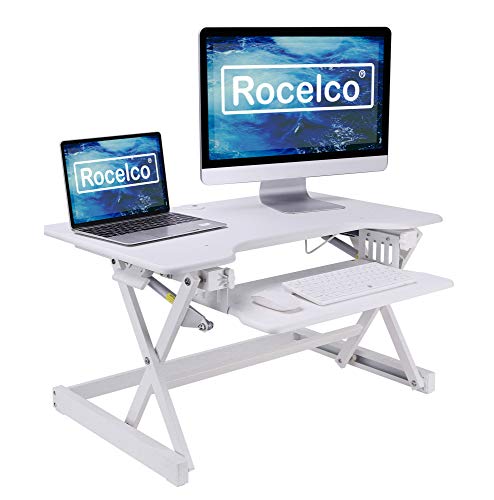
Rocelco 32-Inch Standing Desk Converter
Best for: Dual monitor setups on existing desks
- Desktop Dimensions
- 32" x 20.5"
- Lift Mechanism
- Gas piston assist
- Height Range
- 5" to 18"
- Weight Capacity
- 35 lbs
- Keyboard Tray
- Retractable
- Storage
- Keyboard Tray
View on Amazon: Rocelco 32-Inch Standing Desk Converter Affiliate link
This Rocelco converter offers a 32-inch by 20.5-inch desktop and a retractable 21-inch by 11-inch keyboard tray. It lifts up to 35 pounds using a gas piston assist, with a height range of 5 to 18 inches. The unit requires no assembly and fits directly on your existing surface. It suits you if you need a dual-monitor setup with a dedicated ergonomic tray for your keyboard and mouse.
Pros
- 32-inch wide desktop supports two 24-inch monitors
- Retractable keyboard tray with 4.5-inch spacing for ergonomics
- Gas piston assist allows easy height adjustment from 5 to 18 inches
- No assembly required; places directly on existing desk
- Includes grommet hole for cable management
Cons
- 35-pound weight capacity is lower than many electric alternatives
- Manual gas spring lift lacks the precision of motorized controls
- Fixed 21-inch depth may limit space for large peripherals
Good fit if
- You want a dual-monitor setup without buying a new desk
- You prefer manual adjustment over electric motors
- You need a large keyboard tray for a laptop or full-size keyboard
Skip if
- You require a weight capacity above 35 pounds
- You prefer electric height adjustment for smooth operation
- You need a standing desk that integrates with smart home apps
Verdict: Rocelco 32" Height Adjustable Standing Desk Converter provides a sturdy, no-assembly solution for dual monitors. It fits you if you value a large manual lift surface over electric precision.
Specifications side by side
| Spec | VIVO 32-Inch Standing Desk Converter | Rocelco 32-Inch Standing Desk Converter |
|---|---|---|
| Desktop Dimensions | 31.5" x 15.7" | 32" x 20.5" |
| Lift Mechanism | Manual | Gas piston assist |
| Height Range | 4.5" to 20" | 5" to 18" |
| Weight Capacity | 33 lbs | 35 lbs |
| Keyboard Tray | 31.3" x 11.8" | Retractable |
| Storage | Keyboard Tray | Keyboard Tray |
| Recommended Use | not stated | Dual Monitors |
| Color | Black | White |
| Size | 32-Inch | 32-Inch |
| Dimensions | 31.5 × 31.5 × 31.3 inches | 32 × 20.5 × 5 inches |
| Weight | 26 pounds | 29 pounds |
| Model | Standing Desk | R EADRW |
Frequently asked questions
Which standing desk converter is heavier, VIVO or Rocelco?
The Rocelco model is heavier. It weighs 29 pounds, while the VIVO unit weighs 26 pounds. The extra weight may provide slightly more stability for larger dual monitor setups. You should consider this if you prefer a sturdier feel during manual adjustments.
Does the VIVO converter come in white?
No, the VIVO 32-inch converter is listed in black only. If you need a white finish, you must choose the Rocelco option. The Rocelco model is available in white, which may better match light-colored office furniture or existing desk surfaces.
Which brand offers a keyboard tray?
The Rocelco converter includes a keyboard tray. This feature allows you to position your input devices at a comfortable ergonomic height. The VIVO model does not list a dedicated keyboard tray in its specifications, so you would need to place your keyboard on the main surface or a separate stand.
How deep is the VIVO standing desk surface?
The VIVO surface is 31.5 inches deep. This depth accommodates standard monitor setups but offers less lateral space than the Rocelco. The Rocelco provides a 20.5-inch depth, which is wider than the VIVO's width, allowing for more expansive dual monitor arrangements or larger laptops.
Is the lift mechanism electric on either model?
Neither model uses an electric lift mechanism. The Rocelco utilizes a gas spring system for manual height adjustment. The VIVO also relies on manual lifting. You will need to physically raise or lower both surfaces, which requires some effort compared to motorized alternatives.
Which converter is better for a small desk?
The VIVO converter may fit smaller desks better. It measures 31.5 inches wide and 31.3 inches high. The Rocelco is 32 inches long and 5 inches high when lowered. If your desk has limited width, the VIVO’s slightly narrower footprint might be more suitable for your workspace.