Mount-It! vs Rocelco Computer Workstations: Which Brand Fits You?
As an Amazon Associate we earn from qualifying purchases. Links on this page are affiliate links.
When comparing mount it vs rocelco computer workstation options, you face two distinct approaches to ergonomic flexibility. Both brands offer adjustable height solutions designed to improve posture and comfort during long work sessions. The primary difference lies in their form factor. The Mount-It! model is a standalone rolling cart that replaces your current desk. In contrast, the Rocelco unit is a sit-stand converter that sits on top of your existing surface. This structural choice dictates how each product fits into your workspace layout.
Key differences
| Aspect | Mount-It! 24-Inch Rolling Standing Desk | Rocelco 32-Inch Standing Desk Converter |
|---|---|---|
| Lift Mechanism | Pneumatic foot pedal | Gas piston assist with side handles |
| Height Range | 29.6" to 44.2" | 5" to 18" above desktop |
| Weight Capacity | 17 lbs | 35 lbs |
| Desktop Size | 23.6" x 20.5" | 32" x 20.5" |
| Keyboard Tray | Not listed | Retractable (21" x 11") |
| Mobility | Four caster wheels with locks | Stationary (placed on existing desk) |
Which one should you choose?
Choose Mount-It! 24-Inch Rolling Standing Desk if
- You need a completely mobile workstation that moves easily across different rooms.
- You want to replace your current desk entirely rather than adding to it.
- You prefer adjusting height using a foot pedal for hands-free operation.
Choose Rocelco 32-Inch Standing Desk Converter if
- You have an existing desk you want to convert into a standing setup.
- You need to support heavier equipment, such as dual monitors, with a higher weight capacity.
- You require a dedicated retractable keyboard tray for better ergonomics.
Verdict: Choose the Mount-It! if you prioritize mobility and want a self-contained unit that rolls away when not in use. Select the Rocelco if you already have a sturdy desk and need a high-capacity converter with a built-in keyboard tray. Your decision hinges on whether you need a new standalone piece of furniture or an upgrade for your current workspace.
Mount-It vs Rocelco Desk Comparison
Lift Mechanism
The Mount-It! model uses a pneumatic foot pedal for height changes. You adjust it from 29.6 inches to 44.2 inches by pressing a lever near the floor. This allows hands-free operation while your hands remain on the desk or in your lap. The Rocelco unit relies on gas piston assist with side handles. You lift it manually from 5 inches to 18 inches above your existing surface. The Mount-It! approach offers greater total height range for full standing use. The Rocelco design is simpler but requires manual lifting effort for each adjustment.
Weight Capacity
Your equipment load matters for long-term stability. The Mount-It! desk supports up to 17 pounds. This limit suits lightweight laptops and small accessories but restricts heavier dual-monitor setups or large desktop towers. The Rocelco converter handles up to 35 pounds. This higher capacity accommodates two 24-inch monitors or a single 32-inch screen comfortably. If you plan to mount multiple displays or keep a sturdy laptop on the surface, the Rocelco provides significantly more structural support for your gear.
Desktop Size
Surface area dictates how much gear fits comfortably. The Mount-It! offers a 23.6-inch by 20.5-inch top. This compact footprint works well in small offices, dorms, or tight corners. It fits a laptop, keyboard, and mouse without crowding. The Rocelco provides a wider 32-inch by 20.5-inch surface. This extra width allows for dual monitors side-by-side or more space for paperwork. If you need room for multiple screens or a broad workspace, the Rocelco’s larger footprint is the practical choice.
Storage
Integrated storage helps keep your workspace organized. The Rocelco model includes a retractable ergonomic keyboard tray. It measures 21 inches wide by 11 inches deep and sits 4.5 inches below the main desktop. This keeps your monitor at eye level while your arms rest comfortably. The Mount-It! product does not list a built-in keyboard tray in its specifications. You would need to place a separate tray on the surface or use a lap desk. The Rocelco offers superior built-in organization.
Mobility
How you move the desk affects daily use. The Mount-It! sits on four smooth-rolling caster wheels. Two of these wheels lock securely to keep the desk stationary while you work. This design allows you to roll the entire unit to different rooms or meeting spaces easily. The Rocelco is a desktop converter. It sits on top of your existing desk and has no wheels. You move it only by lifting it off the table. The Mount-It! is clearly better for frequent relocation.
Which standing desk brand fits you?
You need a fully mobile, independent unit.
The Mount-It! model stands on four caster wheels, allowing you to move it anywhere. Two wheels lock for stability. Its pneumatic foot pedal lets you adjust the height from 29.6 to 44.2 inches without using your hands. This makes it ideal for shared spaces or classrooms where you need to relocate the workstation frequently.
You want to keep your existing desk.
The Rocelco converter sits on top of your current surface. It requires no assembly. You raise the platform using gas piston assist handles. The height adjusts from 5 to 18 inches above your desk. This option saves floor space and lets you convert a standard table into a standing workstation without buying a new piece of furniture.
You need a large surface for dual monitors.
The Rocelco offers a 32-inch wide desktop, significantly larger than the Mount-It! 23.6-inch surface. It also includes a retractable 21-inch keyboard tray. This setup supports two 24-inch monitors comfortably. The extra width provides ample room for multiple screens and accessories, keeping your workspace organized and ergonomic while you work.
You prefer a compact, standalone laptop desk.
The Mount-It! features a 23.6 by 20.5-inch desktop, which is compact yet spacious enough for a laptop, keyboard, and mouse. It supports up to 17 pounds. The unit is self-contained with its own frame and wheels. This makes it a practical choice for small offices, dorms, or areas where you need a dedicated, movable laptop station.
The products compared
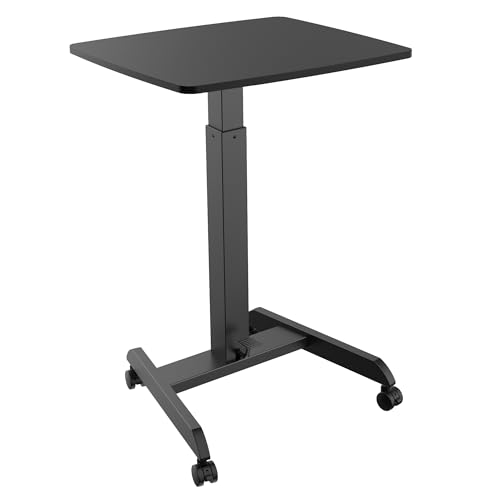
Mount-It! 24-Inch Rolling Standing Desk
Best for: mobile workstations with pneumatic lift
- Desktop Dimensions
- 23.6" x 20.5"
- Lift Mechanism
- Pneumatic
- Height Range
- 29.6" - 44.2"
- Weight Capacity
- 17 lbs
- Color
- Black
- Dimensions
- 20.5 × 23.6 × 44.2 inches
View on Amazon: Mount-It! 24-Inch Rolling Standing Desk Affiliate link
This Mount-It! mobile workstation adjusts from 29.6 to 44.2 inches using a pneumatic foot pedal. The 23.6 by 20.5 inch desktop fits laptops and peripherals. It supports 17 pounds and rolls on four casters with two locks. The steel and particleboard build suits small spaces. You get U.S. support and color options.
Pros
- Pneumatic foot pedal for quick height changes
- 23.6 by 20.5 inch desktop surface
- Four caster wheels with two locking mechanisms
- Supports up to 17 pounds
Cons
- 17-pound weight limit is lower than standard desks
- Desktop dimensions are compact for large setups
- Available in Desk Only or with Keyboard Tray
Good fit if
- You need a mobile cart for small offices
- You want pneumatic height adjustment
- You work in classrooms or healthcare
Skip if
- You require a high weight capacity
- You need a large fixed desktop
- You prefer electric lift mechanisms
Verdict: Mount-It! Rolling Laptop Desk offers pneumatic mobility for light tasks. It fits users who move their workspace often and prioritize compact dimensions over heavy load capacity.

Rocelco 32-Inch Standing Desk Converter
Best for: Dual monitor setups on existing desks
- Desktop Dimensions
- 32" x 20.5"
- Lift Mechanism
- Gas piston assist
- Height Range
- 5" to 18"
- Weight Capacity
- 35 lbs
- Keyboard Tray
- Retractable
- Storage
- Keyboard Tray
View on Amazon: Rocelco 32-Inch Standing Desk Converter Affiliate link
The Rocelco 32" standing desk converter sits on your existing surface to add ergonomic height. It features a 32" by 20.5" desktop and a retractable 21" by 11" keyboard tray. A gas piston lift adjusts the height 5" to 18" above your desk. This setup supports up to 35 lbs and includes a grommet hole for cable management. It requires no assembly and fits users who want a dual-monitor workspace.
Pros
- 32" wide desktop supports two 24" monitors or one 32" monitor
- Retractable keyboard tray with 4.5" spacing for ergonomic viewing
- Gas piston lift allows smooth height adjustment from 5" to 18"
- No assembly required; place directly on existing desk
- Grommet hole for cable management or monitor mount installation
Cons
- 35 lbs weight capacity is lower than typical desk frames
- Requires 21" of desk depth to operate safely
- Limited to sit-stand conversion rather than full desk replacement
Good fit if
- You already have a sturdy desk and want to add standing capability
- You need a wide surface for dual monitors or a large laptop
- You prefer a setup that requires no assembly or tools
Skip if
- You need to lift more than 35 lbs of equipment
- Your desk has less than 21" of usable depth
- You want a complete desk replacement rather than a converter
Verdict: Rocelco 32" Height Adjustable Standing Desk Converter is a practical riser for users with ample desk depth who need a wide surface for dual monitors without the hassle of assembly.
Specifications side by side
| Spec | Mount-It! 24-Inch Rolling Standing Desk | Rocelco 32-Inch Standing Desk Converter |
|---|---|---|
| Desktop Dimensions | 23.6" x 20.5" | 32" x 20.5" |
| Lift Mechanism | Pneumatic | Gas piston assist |
| Height Range | 29.6" - 44.2" | 5" to 18" |
| Weight Capacity | 17 lbs | 35 lbs |
| Keyboard Tray | not stated | Retractable |
| Storage | not stated | Keyboard Tray |
| Recommended Use | not stated | Dual Monitors |
| Color | Black | White |
| Size | Small | 32-Inch |
| Dimensions | 20.5 × 23.6 × 44.2 inches | 32 × 20.5 × 5 inches |
| Weight | not stated | 29 pounds |
| Model | MI-7997BLK | R EADRW |
Frequently asked questions
Does the Mount-It! desk fit under a standard table?
No, it is a standalone mobile workstation. The Mount-It! 24-Inch model measures 20.5 inches in length and 23.6 inches in width. It sits on its own base with caster wheels rather than tucking under existing furniture. You use it as an independent unit for light tasks.
Can the Rocelco converter hold two monitors?
Yes, it is recommended for dual monitor setups. The 32-inch surface provides ample width for side-by-side screens. Its gas spring lift mechanism supports the weight while you adjust the height. This design helps you maintain proper eye level without straining your neck during long work sessions.
Is the Mount-It! desk heavy to move around?
It is designed for mobility. The unit features four caster wheels, with two locking for stability when you stop moving. While the Rocelco converter weighs 29 pounds, the Mount-It! model is built to be rolled easily. You can reposition your workspace quickly without lifting the entire desk.
Does the Rocelco desk come with a keyboard tray?
Yes, it includes a dedicated storage area for your keyboard. This tray sits below the main monitor platform, allowing you to maintain a neutral wrist position. The 32-inch width accommodates both your monitors and the keyboard tray comfortably, keeping your primary workspace organized and ergonomic.
What is the maximum height of the Mount-It! desk?
The maximum height reaches 44.2 inches. You adjust this using a pneumatic foot pedal, which allows hands-free operation. The height range starts at 29.6 inches. This adjustable range lets you find a comfortable standing position that suits your specific body height and workspace requirements.
Is the Rocelco converter easy to assemble?
It requires minimal assembly compared to a full desk. The unit arrives mostly pre-assembled, focusing on a practical riser design. You primarily place it on your existing desk surface. The gas spring mechanism is ready to use, making it ideal for users who want immediate ergonomic benefits without complex setup.