FLEXISPOT vs Rocelco: Computer Workstations Compared by Specs
As an Amazon Associate we earn from qualifying purchases. Links on this page are affiliate links.
This FLEXISPOT vs rocelco computer workstation comparison focuses on two distinct desk risers. Both products convert your existing desk into a standing workstation without complex assembly. The main difference lies in their lift mechanisms and surface dimensions. You need to decide between a wide, spring-loaded platform or a compact, gas-piston model with a retractable tray. We compare their published specs to help you choose the right fit for your space and ergonomic needs.
Key differences
| Aspect | FLEXISPOT 42-Inch Standing Desk Converter | Rocelco 32-Inch Standing Desk Converter |
|---|---|---|
| Lift Mechanism | Mechanical Spring | Gas piston assist |
| Desktop Dimensions | 42" x 24.9" | 32" x 20.5" |
| Weight Capacity | 33 lbs (top) | 35 lbs |
| Keyboard Tray | Fixed | Retractable |
| Color | Black | White |
Which one should you choose?
Choose FLEXISPOT 42-Inch Standing Desk Converter if
- You need a wider surface for dual monitors or extensive workspace.
- You prefer a mechanical spring system that avoids gas leaks.
- You want a fixed keyboard tray for a stable, permanent setup.
Choose Rocelco 32-Inch Standing Desk Converter if
- You want to adjust the keyboard tray position for better ergonomics.
- You have limited desk depth and need a compact footprint.
- You prefer a gas piston lift for smooth, continuous height adjustment.
Verdict: Choose the FLEXISPOT if you prioritize a large, stable surface for multiple monitors and a durable mechanical lift. Select the Rocelco if you value ergonomic flexibility with a retractable tray and a more compact design that fits smaller desks.
FLEXISPOT vs Rocelco Spec Showdown
Lift mechanism
The FLEXISPOT converter uses a mechanical spring system. This design relies on steel spring wire to provide smooth height adjustments. The brand notes this avoids common gas spring issues like air leakage or performance drops over time. In contrast, the Rocelco model features a gas piston assist. This mechanism allows for continuous height adjustment from 5 inches up to 18 inches above your existing desktop. Gas pistons often offer a different feel during elevation changes. You should consider whether you prefer the long-term reliability claims of mechanical springs or the smooth, continuous motion typical of gas-assisted lifts for your daily workflow.
Desktop size
Surface area is a major differentiator here. The FLEXISPOT unit offers a generous 42-inch width by 24.9 inches in depth. This extra-large workspace is designed to accommodate dual monitors, laptops, and various office accessories without crowding. The Rocelco converter provides a 32-inch wide by 20.5-inch deep surface. While still spacious, it is significantly smaller than the FLEXISPOT option. If you have a wide desk and need room for multiple screens or extensive paperwork, the FLEXISPOT’s larger footprint offers more flexibility. The Rocelco’s smaller dimensions may suit users with limited desk space or those who prefer a more compact setup.
Weight capacity
Load limits vary between these two converters. The FLEXISPOT top surface supports up to 33 pounds, while its keyboard tray holds 4.4 pounds. This makes it suitable for heavier monitor setups and additional accessories. The Rocelco model boasts a higher total weight capacity of 35 pounds for the entire unit. However, specific breakdowns for the tray versus the main surface are not detailed in the provided data. If you plan to place heavy equipment on the tray itself, the FLEXISPOT’s explicit tray limit is useful. For overall top load, the Rocelco offers a slight edge in total pounds.
Keyboard tray
Both units include a keyboard tray to improve ergonomics, but their designs differ. The FLEXISPOT features a fixed keyboard tray that keeps your arms at a natural angle. The Rocelco model includes a retractable keyboard tray that extends for optimum comfort. It also specifies a 4.5-inch spacing between the tray and desktop, which helps maintain proper monitor height to prevent neck strain. The Rocelco tray measures 21 inches by 11 inches, which is large enough to hold a laptop. If you need to slide the tray away to create more desktop space, the Rocelco’s retractable design offers that specific functionality.
Color options
Finish choices allow you to match your existing decor. The FLEXISPOT converter is available in Black, Rustic, and Walnut finishes. It also comes in various sizes, giving you more visual flexibility. The Rocelco model is listed as White in the primary data, though variations include Black, Teak/Black, and Black Acusb options. If you prefer a dark, neutral look, both brands offer black variants. The FLEXISPOT’s Rustic and Walnut options might appeal to those seeking warmer wood tones, while the Rocelco’s White option suits minimalist or bright office environments. Your choice depends on how well these specific colors integrate with your current workspace aesthetic.
Which standing desk converter fits your needs
You need a wide surface for multiple screens
The FLEXISPOT model offers a 42-inch by 24.9-inch top. This extra width accommodates dual monitors or a full desk setup comfortably. The mechanical spring lift provides stable height changes without relying on gas pistons. You get a heavy-duty steel frame that supports up to 33 pounds on the main surface. This size is ideal for maximizing your workspace productivity.
You want easy height adjustments for all users
The Rocelco converter features a gas piston assist with a 5-inch to 18-inch height range. This continuous adjustment helps optimize ergonomic positioning for people of varying heights. The side handles make lifting simple. It also includes a retractable keyboard tray with 4.5 inches of spacing to keep your monitor at a proper angle. This flexibility suits diverse body types.
You prefer a lighter unit with cable management
At 29 pounds, this Rocelco unit is lighter than the FLEXISPOT alternative. It includes a grommet hole for hassle-free cable management. You can also install monitor mounts directly through the hole. The design requires no assembly, so you simply remove it from the box and place it on your desk. This convenience speeds up your setup process significantly.
The products compared

FLEXISPOT 42-Inch Standing Desk Converter
Best for: Dual monitor setups on existing desks
- Desktop Dimensions
- 42" x 24.9"
- Lift Mechanism
- Mechanical Spring System
- Weight Capacity
- 33 lbs
- Keyboard Tray
- Wide Keyboard Tray
- Color
- Black
- Dimensions
- 24.9 × 42 × 19.6 inches
View on Amazon: FLEXISPOT 42-Inch Standing Desk Converter Affiliate link
This FLEXISPOT XLB converter offers a 42 by 24.9 inch surface for dual monitors. It uses a mechanical spring lift system for smooth height changes. The top holds 33 pounds and the tray holds 4.4 pounds. It weighs 35.1 pounds. You get a large workspace without replacing your desk. It suits those needing extra room for multiple screens.
Pros
- 42 by 24.9 inch desktop surface
- 33 pound weight capacity on top
- Mechanical spring lift system
- Almost fully assembled for quick setup
Cons
- Low 4.4 pound keyboard tray capacity
- No remote control for height adjustment
- Heavier at 35.1 pounds to move
Good fit if
- You need space for dual monitors
- You want a spring-based lift mechanism
- You prefer a large 42 inch surface
Skip if
- You need to lift heavy equipment over 33 pounds
- You want electric motor adjustments
- You require a wireless remote control
Verdict: FLEXISPOT 42" XLB Standing Desk Converter provides a wide 42 inch workspace with reliable mechanical springs. It fits users who need extra screen real estate and stable manual height changes.
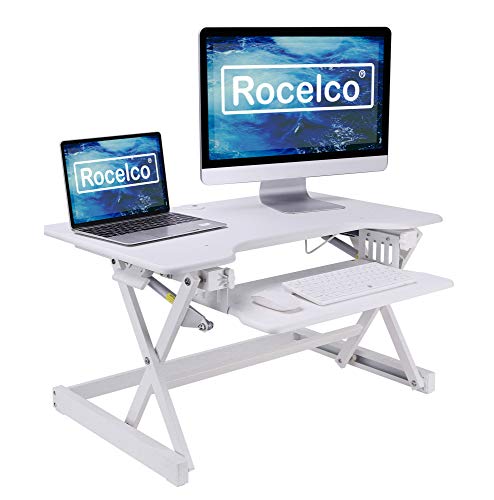
Rocelco 32-Inch Standing Desk Converter
Best for: Quick desktop conversion without assembly
- Desktop Dimensions
- 32" x 20.5"
- Lift Mechanism
- Gas piston assist
- Height Range
- 5" to 18"
- Weight Capacity
- 35 lbs
- Keyboard Tray
- Retractable
- Storage
- Keyboard Tray
View on Amazon: Rocelco 32-Inch Standing Desk Converter Affiliate link
This 32-inch desktop riser converts your existing workspace into a sit-stand station. It features a gas piston lift mechanism that adjusts height from 5 to 18 inches. The main surface measures 32 by 20.5 inches, supporting dual monitors. A retractable keyboard tray adds 21 by 11 inches of space. It requires no assembly, making it ready to use immediately on your current desk.
Pros
- Gas piston assist for smooth height adjustment
- Retractable keyboard tray for ergonomic positioning
- No assembly required for immediate use
- Supports up to 35 lbs of equipment
Cons
- 35 lbs weight capacity limits heavy setups
- 32-inch surface is smaller than 42-inch options
- Manual lift mechanism lacks electric control
Good fit if
- You want to convert an existing desk instantly
- You need a compact workspace under 32 inches
- You prefer manual gas spring adjustment
Skip if
- You require electric motor lifting
- You need a surface wider than 32 inches
- You plan to mount heavy equipment over 35 lbs
Verdict: Rocelco 32" Height Adjustable Standing Desk Converter suits those who want a quick, tool-free upgrade for a standard desk. It fits users who prioritize manual ease and compact dimensions over electric power or large surfaces.
Specifications side by side
| Spec | FLEXISPOT 42-Inch Standing Desk Converter | Rocelco 32-Inch Standing Desk Converter |
|---|---|---|
| Desktop Dimensions | 42" x 24.9" | 32" x 20.5" |
| Lift Mechanism | Mechanical Spring System | Gas piston assist |
| Height Range | not stated | 5" to 18" |
| Weight Capacity | 33 lbs | 35 lbs |
| Keyboard Tray | Wide Keyboard Tray | Retractable |
| Storage | Keyboard Tray | Keyboard Tray |
| Recommended Use | not stated | Dual Monitors |
| Color | Black | White |
| Size | 42" | 32-Inch |
| Dimensions | 24.9 × 42 × 19.6 inches | 32 × 20.5 × 5 inches |
| Weight | 35.1 pounds | 29 pounds |
| Model | XLB | R EADRW |
Frequently asked questions
Does the FLEXISPOT converter need assembly?
The FLEXISPOT 42-Inch Standing Desk Converter is designed for immediate use without complex setup. You simply place it on your existing desk surface. The mechanical spring system is pre-installed, allowing you to start adjusting the height right away. This makes it a convenient option for users who want to avoid tools or instructions.
How heavy is the Rocelco desk converter?
The Rocelco 32-Inch Standing Desk Converter weighs 29 pounds. This weight contributes to its stability during manual height adjustments. Despite being lighter than some competitors, it remains sturdy enough to support dual monitors. You can easily move it if needed, but it stays firmly in place while you work.
What lift mechanism does the FLEXISPOT model use?
The FLEXISPOT XLB converter utilizes a mechanical spring system. This design relies on steel spring wire to provide smooth height changes. The brand states this approach avoids common issues found in gas springs, such as air leakage or performance drops over time. You get consistent resistance without relying on pressurized gas.
Is there a keyboard tray on the FLEXISPOT converter?
The provided specifications for the FLEXISPOT 42-Inch model do not mention a dedicated keyboard tray. The focus is on the 42-inch by 24.9-inch primary workspace. You may need to place your keyboard on the main surface or on your existing desk. Check the product details for any included accessories before purchasing.
Can the Rocelco converter hold two monitors?
Yes, the Rocelco 32-Inch converter is recommended for dual monitor setups. The 32-inch width provides adequate space for two screens side by side. The gas spring lift ensures stable positioning while you view your content. It is a compact solution that fits well on standard desks without requiring much additional footprint.
What color options are available for these converters?
The FLEXISPOT 42-Inch model is available in Black. The Rocelco 32-Inch model comes in White. These color choices allow you to match your existing office decor. The FLEXISPOT offers a darker aesthetic, while the Rocelco provides a lighter option. Select the color that best complements your current workspace environment.
How high can the FLEXISPOT converter go?
The FLEXISPOT 42-Inch Standing Desk Converter reaches a maximum height of 19.6 inches. This range allows you to transition from sitting to standing comfortably. The mechanical spring system supports this height adjustment smoothly. You can customize your workspace ergonomics by setting the desk to your preferred level for typing or viewing.
Does the Rocelco converter require tools for setup?
No, the Rocelco 32-Inch converter requires no tools for setup. It is designed for a quick, tool-free upgrade to your standard desk. You can place it on your surface and begin using it immediately. This makes it ideal for users who want a fast solution without dealing with screws or assembly instructions.